
Key points
There is a "workshop format" used in real time on-site, and a "public comment format" that sets a dialogue period of 2–4 weeks.
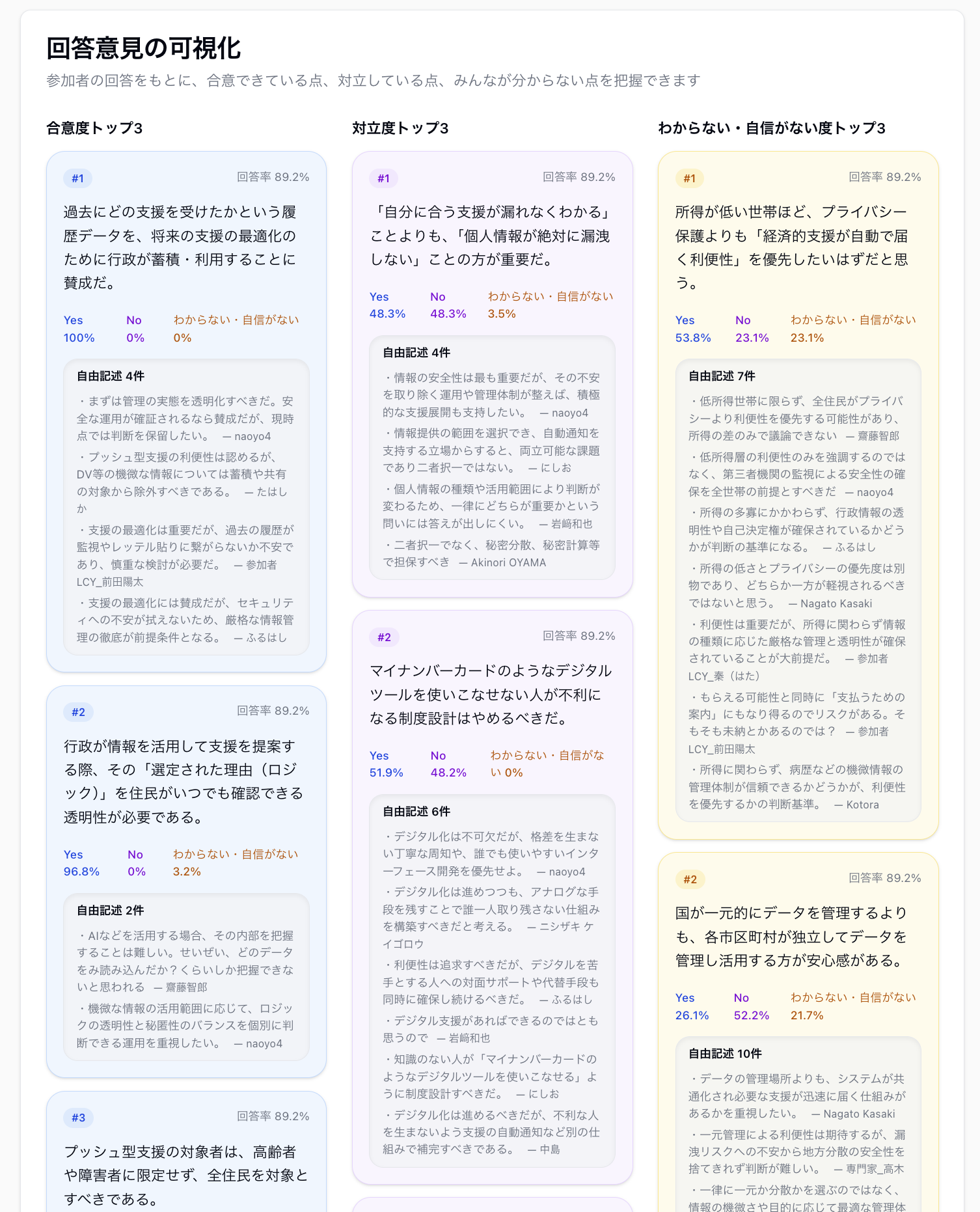
Once everyone has responded, display the results on screen to confirm points of agreement and disagreement before moving into discussion.
AI does not replace facilitation; it supports it.
Updated
Overview
This is a guide for organizers running residents' meetings or workshops using Cartographer (Baisoku Kaigi). It covers everything from preparation and the day of the event to using post-session reports and the conditions for self-hosting. For the basic flow of a single session, please see the What is Cartographer guide (opens in a new tab).
- Author: Shunsuke Takagi (Representative, Plural Reality LLC)
- Verified on: November 27, 2026
- How it was created: Drafted with AI (Gemini) and reviewed by the author.
- If you notice any errors, please let us know at info@plural-reality.com (opens in a new tab).
Decisions to Make Before You Start
First, choose the format for your event. There is a "workshop format" used in real time on site, and a "public comment format" with a dialogue period of 2 to 4 weeks. There are no fixed guidelines for the number of questions, session length, or maximum number of participants. Organizers decide these according to the purpose of the meeting. If you are unsure, please consult with us.
You should also confirm data storage locations in advance. For the hosted version of Cartographer, the application runs in the AWS Tokyo region, and the response database is in the US East region (Supabase us-east-2). AI processing may take place outside Japan. For Baisoku Survey (a system in which AI asks follow-up questions based on responses) used to gather voices in advance, the database is in Tokyo (Supabase ap-northeast-1).
Preparation
Designing Questions
We recommend that organizers try it out first before using it in an actual session. Cartographer is currently free, and you can try it in 3 minutes with just an email address.
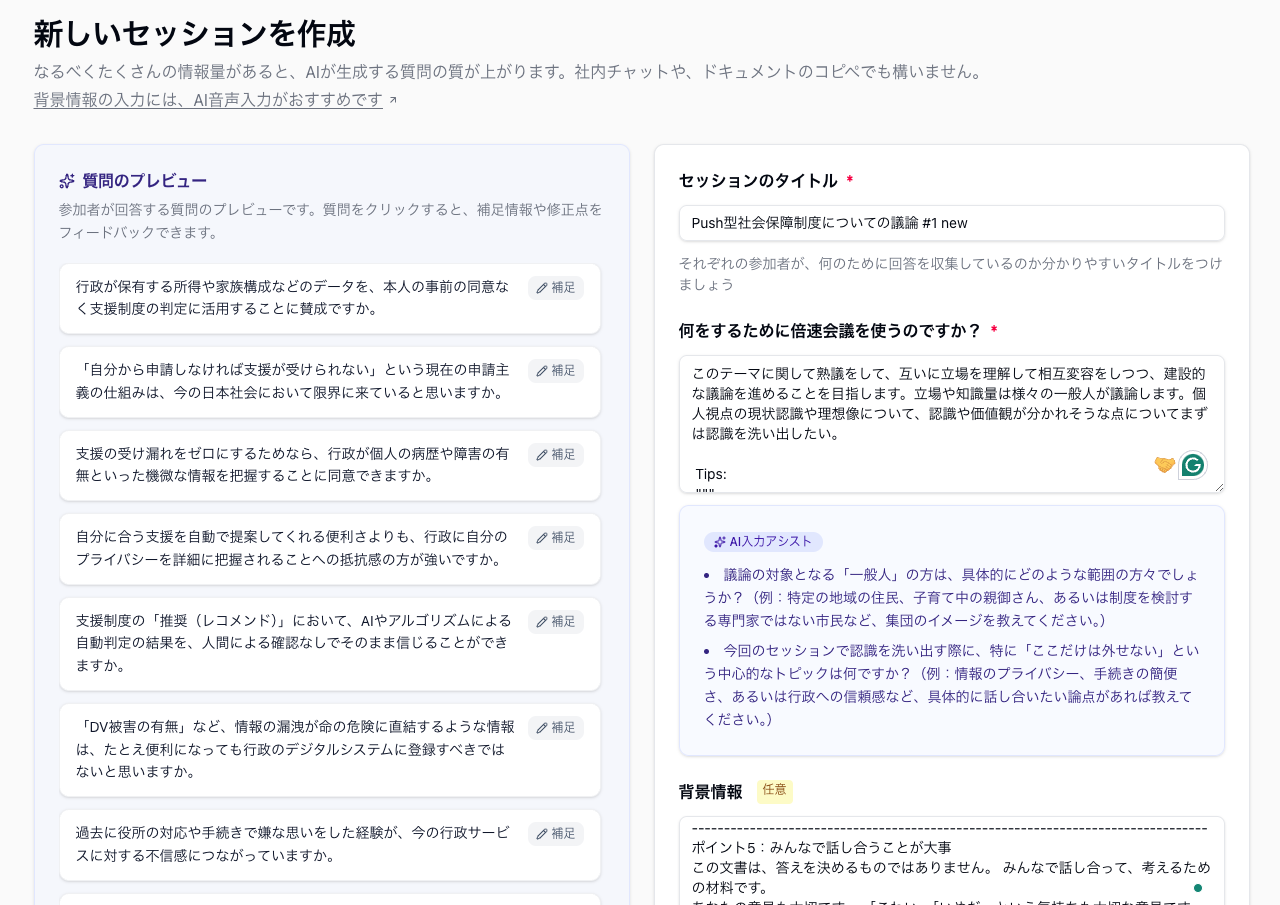
To create a session, start from a template or a blank slate, and enter a title, purpose ("What are you using Cartographer for?"), and optional background information. The more supplementary information you add, the higher the accuracy of the questions, which you can check in the preview.
Pre-session Learning and Guidance
Once created, a participation link and QR code are automatically generated. Participants can start answering from their browser.
As a way to encourage pre-session learning, you can also load municipal documents into NotebookLM (a tool that lets you upload documents and ask questions about them). In Yosano Town (a case that did not use Cartographer), they created a knowledge base and handbook from over 30 official documents. You can also use Baisoku Survey if you want to gather input in advance.
Venue and Devices
Participants answer using their smartphones. Prepare explanations for those unfamiliar with operating them, as well as arrangements for family members or organizing staff to assist alongside them.
In the Higashiosaka City meeting (which used the conversational AI "Mirai Teian Talk"), QR codes were placed on the tables for participants to answer, and they also wrote down their ideas on sticky notes.
Flow on the Day of the Event
Procedure and Examples
Share the participation link in advance at the venue and set aside time at the beginning for answering. After everyone has responded, display the results on screen, review points of agreement and disagreement, and move into discussion.
The flow of the DD2030 case study (opens in a new tab) (January 10, 2026, Zoom, approx. 3 hours) was as follows:
- Pre-session input: Share background materials and a NotebookLM summary
- Round 1: Answer the AI's questions and visualize positions
- Group discussion 1: Small-group discussion in breakout rooms (with a facilitator in each room)
- Round 2: AI generates new questions based on the transcript, and participants answer again
- Group discussion 2: Discuss the deepened issues
- Plenary sharing and wrap-up: Review each group's results, points of agreement, and remaining issues
A paper by DemocracyNext presents another example. After expert briefings and Q&A, and before small-group discussions, participants use Cartographer to reflect on their own thoughts and "what they still do not know." They then share that output on a large screen at each table before starting the discussion.
Monitoring and Iteration During the Session
During the session, you can check response and participation status as well as the facilitator AI's moderation log in real time from the admin screen. You can also regenerate questions for the next round based on the discussion transcript.
After the Session
After the session ends, the following two types of reports are automatically generated:
- Structured analysis report (for staff and policymakers): Topic structure, distribution of agreement, and lines of disagreement
- Citizens' report (for citizens and participants)
Each participant receives a "My Report," and the organizers receive the overall report, which serves as material for feeding back the results. Reports support URL sharing and PDF export. From the top 3 items by level of agreement, level of disagreement, and level of "I don't know," you can determine which issues to prioritize for discussion.
Role of the Facilitator
AI does not replace facilitation; it supports it. Our three principles for AI facilitation (opens in a new tab) are: "Augmentation over automation," "Do not cut away time and friction," and "Participants can verify."
As in Yosano Town (a case that did not use Cartographer), AI handles transcription, structuring, and visualization, while humans read facial expressions and attend to the atmosphere in the room. In that case, a three-layer verification process was used: facilitators checked the drafts, participants did the final check, and the original text was preserved.
In the DD2030 case study, five members who were not experts in deliberation (informed discussion) served as facilitators. Rather than specialized expertise, the requirements were the following three:
- Support from a neutral standpoint
- Ensure equal opportunity for everyone to speak
- Do not state your own opinions
In addition to "statements" for voting (short opinion sentences asking for agreement or disagreement), Cartographer also suggests prompts to deepen the discussion.
Self-Hosting
On November 6, 2026, we released the open-source version (a public version that can be used and modified) in our GitHub repository (opens in a new tab). The aim is to allow organizations to run it in their own environment without procurement or contracts. We do not divide editions by features; the difference from the hosted version is who operates it.
- Cost and operation: Free. You provide your own server, database, and LLM (large language model) API key. You also handle updates, incident response, question design, and facilitation yourself.
- Support and versions: Inquiries are handled via GitHub Issues, with no warranty of operation. Updates may lag behind and may not match the hosted version. Production deployment configurations are not included.
- Required environment: Node.js 20 or higher and npm, Docker (for local Supabase), Supabase CLI, an OpenRouter API key (and optionally Nix).
- Configuration and storage: At least 4 environment variables are required (Supabase URL, anon key, service_role key, and OPENROUTER_API_KEY). When exposing publicly, set at least PARTICIPANT_TOKEN_SECRET (the signing key for participant tokens); IP allowlists and Basic authentication are also supported. Data is stored in the database you provision yourself.
From the admin screen, you can pause the agent (the AI that autonomously advances processing) and review the Plan before proceeding to the Survey. Posted messages are reflected in the next generation. Once the response rate exceeds 80%, the survey is considered complete, and after analysis it moves on to creating the next plan.
Both Japanese and English are supported. It can also read proposals and comments from the public GraphQL API of Decidim (a citizen participation platform) to create drafts and questions (it does not write back).
The license is GNU AGPL v3 (a license requiring source code disclosure even when providing a modified version over a network). When providing a modified version over a network, please make the source code available in accordance with Section 13 of the AGPL. Because the "Cartographer" ("Baisoku Kaigi") name and logo are our marks, please use a name that avoids confusion for modified versions.
Contact and Consultation
For detailed features and usage patterns, please see the page for local governments (opens in a new tab). If we support your preparation and on-the-day facilitation, the guideline cost starts from 440,000 JPY (220,000 JPY for preparation + 220,000 JPY per event day, tax included).
There are no fixed guidelines for the scale or schedule of a meeting; organizers decide these according to the purpose of the meeting. If you are unsure, please consult with us.
Related Resources (Cartographer Public Scrapbox)
Detailed usage instructions and feature updates (release notes) for Cartographer are compiled on our public Scrapbox.
- How to use Cartographer and release notes (倍速会議の使い方とリリースノート(公開Scrapbox)) (opens in a new tab)
- Release note: Separate "Overview" shown to participants from the main topic for AI (リリースノート:参加者に見せる「概要」を、本題(AI用)と分けて設定できるように) (opens in a new tab)
- Using voice input to write plenty of supplementary information (「補足情報」をたくさん書くために音声入力を活用する) (opens in a new tab)
- Recommended ways to answer (推奨する質問への答え方) (opens in a new tab)
- Running Cartographer multiple times (何回も倍速会議を行う) (opens in a new tab)
- Release note: Removal of login feature, unifying management to shared URLs (リリースノート:ログイン機能の廃止(管理は共有URLに一本化)) (opens in a new tab)
Related case studies
Frequently asked questions
- Where is the data stored?
- For the hosted version of Cartographer, the application runs in the AWS Tokyo region, and the response database is in the US East region (Supabase us-east-2). AI processing may take place outside Japan.
- How do participants respond?
- Once created, a participation link and QR code are automatically generated. Participants can start responding from a web browser.
- Do facilitators need specialist expertise?
- In the DD2030 case study, 5 members who were not experts in deliberation facilitated the session. Rather than specialized expertise, the three requirements were to provide neutral support, ensure equal speaking opportunities for everyone, and refrain from stating one's own opinion.
- How much does it cost? Can we run it ourselves?
- If we support preparation and running the event on the day, the estimated cost starts from JPY 440,000 (JPY 220,000 for preparation + JPY 220,000 per event day, tax included). On November 6, 2026, we released the open-source edition in our GitHub repository. You provide your own server, database, and LLM API keys.
Talk to us about your project
From designing a meeting or survey to running it, we help you decide where to start. Please contact us.
Contact us